

On this page
For years, cloud migration was framed as a modernisation project you could schedule whenever it was convenient. That framing no longer holds. Businesses still running core systems on-premise are carrying costs and risks their cloud-based competitors have already shed. Here is what has changed, how to think about the move, and where cloud migrations go wrong.
The real cost of staying on-premise
On-premise infrastructure looks cheaper because the hardware is already paid for. The hidden line items tell a different story:
- Refresh cycles. Servers need replacing every three to five years, as a large upfront capital cost.
- Over-provisioning. You size for peak load and pay for idle capacity the rest of the year.
- Maintenance overhead. Patching, cooling, power and physical security all consume staff time and facility budget.
- Slow disaster recovery. Rebuilding from a failed on-premise system can take days without an expensive secondary site.
There is a staffing cost too, and it is the one least often counted. Keeping physical infrastructure healthy requires specific skills that are increasingly hard to hire for, and that knowledge usually sits with one or two people. When they are on leave — or leave permanently — the risk becomes obvious very quickly.
What the cloud changes
A well-architected cloud environment turns most of those fixed costs into usage-based spend, and adds capabilities that are impractical to run yourself: automated backups and point-in-time restore, multi-zone redundancy, autoscaling for traffic spikes, and infrastructure defined as code so environments are reproducible. For most mid-sized businesses this means lower total cost, faster recovery and the ability to ship features without a procurement cycle.
Reproducibility is underrated. When your environment is defined in code, a staging environment identical to production is a command rather than a project, and recovering from a serious failure means rebuilding from a known definition instead of reconstructing a server nobody fully documented.
The honest caveat: cloud can cost more
A migration done badly increases spend rather than reducing it. Lifting oversized virtual machines into a cloud provider and leaving them running around the clock reproduces every inefficiency of the original setup while adding a margin. Unmonitored storage, forgotten test environments and data transfer between regions all accumulate quietly.
Cloud economics reward attention: right-sizing instances, shutting down non-production environments outside working hours, choosing committed-use pricing for steady workloads, and reviewing the bill monthly. Anyone who promises savings without discussing cost governance is selling a migration, not an outcome.
Migration is not lift-and-shift by default
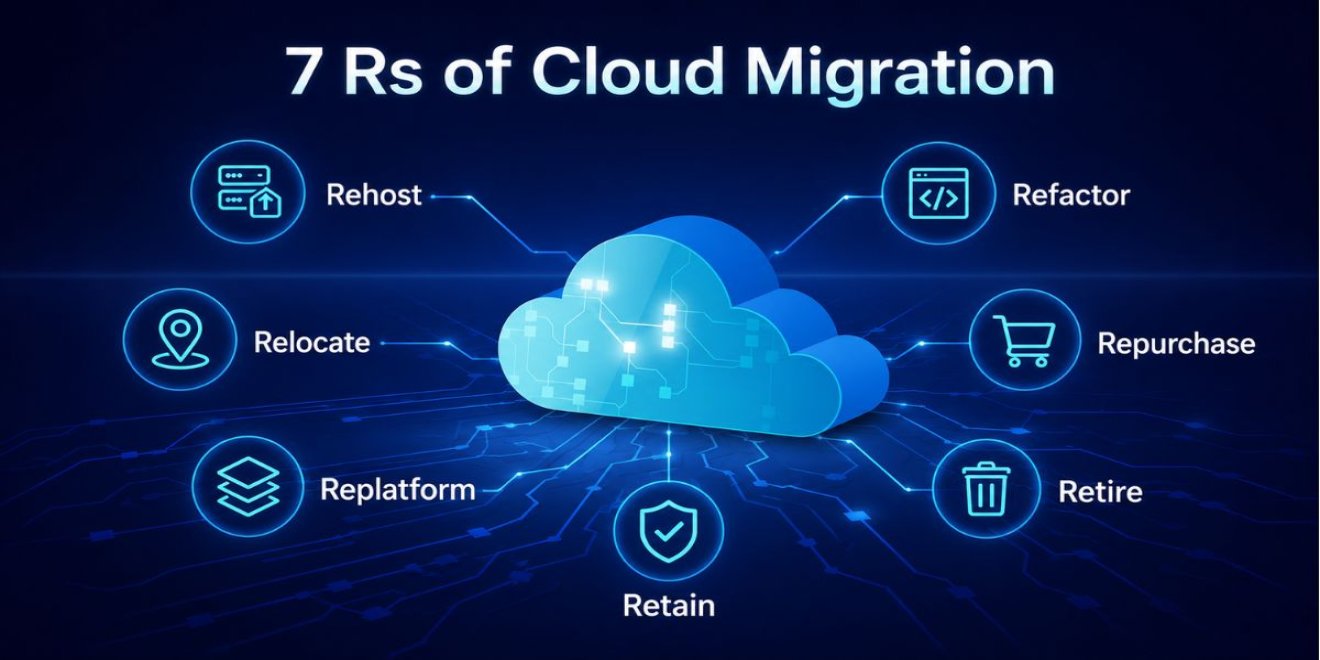
Moving virtual machines as-is (rehosting) is the fastest path but leaves savings on the table. Re-platforming — swapping self-managed databases for managed services, containerising applications, adding autoscaling — captures most of the value. The right mix depends on each workload, and a proper assessment pays for itself by avoiding a migration that just recreates old problems in a new location.
In practice each workload falls into one of a few strategies:
- Rehost — move as-is. Fast, low risk, minimal benefit.
- Re-platform — keep the application, adopt managed databases, storage and scaling. The usual sweet spot.
- Refactor — rework the application to use cloud-native services. Highest cost, highest long-term payoff.
- Repurchase — replace a custom system with a SaaS product that already does the job.
- Retire — switch off what nobody uses. Almost every audit finds something.
- Retain — leave it where it is, for now, with a documented reason.
Sorting your systems into those six buckets before planning anything is the cheapest hour of the whole project.
Security and compliance improve when done properly
Cloud providers give you encryption, identity controls, audit logging and network isolation as standard building blocks. A migration is the ideal moment to introduce least-privilege access, automated compliance checks and proper secrets management — controls that are hard to retrofit onto legacy on-premise systems.
The caveat is the shared responsibility model: the provider secures the infrastructure, while configuration, access and data remain yours. Most cloud incidents trace back to a misconfigured storage bucket or a compromised credential rather than any failure by the provider — which is why the controls in the real cost of ignoring cybersecurity apply just as much after a migration as before it.
How to sequence a migration that does not disrupt the business
Successful migrations are boring, because they are staged:
- Assess — inventory every workload, its dependencies, data volume and business criticality.
- Start small — move something real but low-risk first, to prove the process and expose surprises.
- Build the foundations — networking, identity, logging and cost controls before the bulk of the workloads.
- Migrate in waves — grouped by dependency, with a tested rollback for each wave.
- Optimise afterwards — right-size and re-platform once real usage data exists.
- Hand over — documentation and training, so your team can run it.
The most common cause of a painful cutover is an undocumented dependency: a scheduled job, an integration or a hard-coded IP address nobody remembered. The assessment phase exists to find those while they are cheap.
Ongoing operations matter more than the move
A migration is a project; running the environment is permanent. Monitoring, patching, backup verification and cost review all continue long after the cutover, and a cloud environment left unattended drifts in exactly the way an on-premise one does. That operational layer is what managed IT services provide.
How Webzact Technologies can help
Our cloud and DevOps team runs migrations as a structured project: workload assessment, target architecture, infrastructure as code, a staged cutover and knowledge transfer to your team. We have moved production systems with zero customer-facing downtime. Talk to us about a migration plan scoped to your workloads and budget.
Frequently asked questions
How long does a cloud migration take?
It depends far more on the number and complexity of workloads than on the volume of data. A single application with a straightforward database can move in a few weeks including testing. A portfolio of interdependent legacy systems is a multi-month programme run in waves. The assessment phase is what turns that range into a dated plan for your specific environment.
Will cloud definitely be cheaper than our servers?
Not automatically. A direct lift-and-shift of oversized servers often costs more than the hardware it replaced. Savings come from right-sizing, using managed services instead of self-managed ones, shutting down idle environments and committing to steady workloads for discounted pricing. Cost governance has to be part of the project, not an afterthought.
Can we migrate without downtime?
For most systems, yes. Techniques such as replicating data ahead of the cutover, running both environments in parallel and switching traffic gradually keep customer-facing downtime to zero or to a short planned window. Systems with large databases and strict consistency requirements need more planning, but a multi-day outage is rarely necessary.
What happens to our data and who can access it?
Your data remains yours. You choose the geographic region it is stored in, which matters for data protection compliance, and encryption at rest and in transit is standard. Access is controlled through identity policies you define, and audit logging records who accessed what — usually a significant improvement on an on-premise server room.
Do we still need internal IT staff after moving to the cloud?
Yes, though the work changes. Hardware maintenance disappears, replaced by architecture, automation, cost management and security configuration. Many organisations keep a small internal team focused on applications and business needs while a partner handles infrastructure and out-of-hours operations.